Showing posts with label Internet. Show all posts

Google adds virtual scientific calculator on search


Google search is not only meant for searching Web pages, but also to know stock quote, weather information, time of a city, unit conversion, sports core, quick calculations and more.
Now, the search engine giant has added a 34 button virtual calculation tool to the search. This will help us use the search engine as a calculation tool. The calculator feature is available across almost all the browsers (mobile and web).
To get the 34 button virtual scientific calculator, simple type ‘calculator’ in the search box. There is another way to open the calculator on Google. Type any calculation (example – ’14*5′) in the search box.
Calculator feature of Google is not new, but the 34 button virtual calculator with scientific functions is a recent one. It performs functions such as sine, cosine, tangent, exponential, logarithm, pie, power, square root and natural logarithm apart from normal calculations.
Usually Google adds new features to the search. Previously, it added Knowledge Graph that will display information relevant to a search query. It also introduced Power Searching with Google. It is a free, online course that shows the techniques of Google search and teaches users how to search effectively.

Best Google Adsense Alternatives 2012 [CPC+CPM]

Best Google Adsense Alternative 1 - Adbrite:
Adbrite is easily the next best PPC+CPM ad network that can give decent results for a blogger.I can assure that it is a legit network and I have been paid out and still get payouts, although the CPC for Adbrite is not especially high, it has a good range of CPM ads, I regularly receive around 1.5 -2.0 $ for every 1000 impressions on my other blogs.Hence I would recommend you to use this Google Adsense Alternative if you are unable to use adsense on your site.

Best Google Adsense Alternative 2 - Chitika:
Chitika is also a really good adsense alternative but only if you are a publisher who gets a lot of traffic from USA and Canada.Although Chitika has introduced ads even for Asian and European countries, they pay out very less CPM and even lesser CPC.If you have a majority of traffic from USA and Canada, then I would recommend this over Adbrite.

The Chitika ads do not look very professional and sometimes is plagued by "Answered-Questions" ads which do not result in any revenue for you.This may be the only disadvantage of Chitika.

Best Google Adsense Alternative 3 - Yahoo! Publisher Network:
The Yahoo Publisher Network is also available only for USA publishers and is not available at all for others, this is one of the most professional adsense alternative that can compare (up-to some level) with Adsense.The payout is good and the company is trust-able as it is from Yahoo!

Best Google Adsense Alternative 4 - Infolinks:
Infolinks is the best In-Text advertising network and is the highest paying one too.They have several different ads that look like text or convert a text into an ad, which results in very high CTR of around 5-6%, but the CPC is miserably low, sometimes needing a few clicks to reach 5 cents.

The good thing is they are trust-able and payout out through PayPal when you reach 50$, they are looking for ways to increase CPC, but there is no scope for this as in-text ads can lead to inadvertent clicks and hence publishers wont want to pay much per click.

Best Google Adsense Alternative 5 - Kontera:
The second best Adsense alternative in terms of In-Text Ads, they offer a similar range of options like Infolinks and the CPC is equally low, a close second best to Infolinks.Works in a similar way to Infolinks.

Best Google Adsense Alternative 6 - Bidvertiser:
Bidvertiser is another CPC Adsense Alternative network that has a very limited number of publishers so you wont get many different ads like Adsense, they have limited customization options too.But their CPC is slightly better than that of the In-Text Ads and a lot lesser than Adbrite and Chitika.

SBI Instapay for Instant online payments

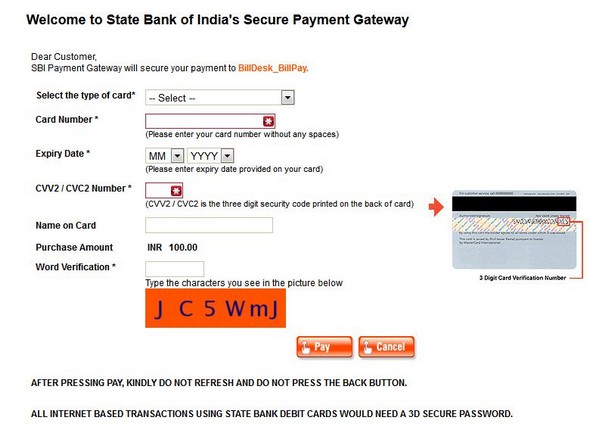
SBI has a service Instapay, other banks also offer similar service, the one I know is HDFC bank. SBI Instapay can be used to pay utility bills as telephone, mobile, electricity and gas, recharge, insurance premium etc.


Here is the link for SBI_Instapay.

If you have an SBI debit card or net banking account, you can use Instapay service. There are very easy steps. And it is very useful if you do not want to open an account to pay your bills. Suppose you want to recharge your prepaid mobile card, you will have to open an account in one of the recharging service but with Instapay you do not need to open and account or login to service providers to recharge. Netbanking account is very useful for Instapay. If you have a debit card, you will have to follow some extra steps.

Mozilla Firefox12.0 released Available for Download

Mozilla Firefox is a fast and full-featured web browser for getting good browsing experience. Now Mozilla released new version 12.0 with some new features and bug fixes.


What's New

  • Windows: Firefox is now easier to update with one less prompt (User Account Control)
  • Page Source now has line numbers
  • Line breaks are now supported in the title attribute
  • Improvements to "Find in Page" to center search result
  • URLs pasted into the download manager window are now automatically downloaded
  • Support for the text-align-last CSS property has been added
  • Various security fixes
  • Some TinyMCE-based editors failed to load
  • OS X: WebGL performance may be degraded on some hardware


Download Links


Firefox12.0 - English - Windows - Download

Firefox12.0 - English - OS X - Download

Firefox12.0 - English - Linux - Download


Kaspersky Antivirus 2013 Beta Download With 90 Days Activation Code License Key


Download kaspersky Antivirus 2013 click here

FREE G Data Internet Security 2012 Download With 4 Months Key

G Data Internet Security 2012 is generally priced at $34.95 for a year subscription. As a part of G Data’s promotions , you can now get to download the G Data Internet Security 2012 with built-in subscription for 4 months (120 days) absolutely free.
Hurry up as this is a limited-period offer.
2>> Now install the security software as you generally do. During installation, select “Trial version“.
You will now have G Data Internet Security 2012 with built-in 4 months subscription free.
OS Compatibility : G Data Internet Security 2012 is fully compatible on Windows XP, Vista and 7 (both 32 & 64 bit).


Features.
1>> Best, award-winning virus detection.
2>> Immediate protection against new viruses.
3>> New Heuristics detects even more unknown viruses.
4>> Virus blockers for e-mails and instant messaging.
5>> Individual user profiles, blocks offensive contents and more.
6>> Switches automatically to Autopilot for gaming and movies.
7>> Idle scan does virus checking when the user or system is inactive.
8>> On-execution monitoring mode for heavily loaded systems.
9>> All vital information at a glance in Security Center.
10>> Trace eraser and data shredder.
11>> Blocks banners, pop-ups, Flash, Java / VB script, etc.

How to send free SMS from Gmail


There are lots of websites available on the internet like way2sms, 160by2, anonymous sms sites and many more through which you can send free SMS. Now Google has also launched a new service to Send SMS from Gmail account. This service is currently not available in India as well as some other countries.
SMS will be sent from your Gmail Chat itself. You just have to enter the mobile number of your friend to send free SMS. If your friend replies back to your message then he has to pay normal SMS charges and the message will be received in your chat . This service limits your SMS length to maximum of 50 characters and you can send only 50 SMS from your account in a day. But the amazing thing of this service is, if your friend reply back to your message then you will get 5 extra SMS but this cannot exceed 50.

Review for Internet Download Manager


Internet Download Manager is a powerful download manager that promises to accelerate downloads by up to 500 percent. 


In addition, the application can also restart interrupted downloads and integrate into a large number of browsers, including Internet Explorer,Firefox, Google Chrome and Opera.

Internet Download Manager's interface is clean and well-organized, with large, stylish buttons that facilitate the management of the files in process. It is a great organizer too, as every single download can be moved into a different folder, depending on its type. Plus, it has a rich settings menu where you can change the way the program handles certain file formats or the default download locations.